Issuing Refunds with Trip Assurance in Xola
Description:
This knowledge base entry will provide a step-by-step guide on how to process refunds for customers who have purchased trip assurance using the Xola software.
Steps:
- Understanding the Policy:
- If a customer has trip insurance and meets the conditions to receive a refund, the refund amount should exclude the trip insurance cost.
- The industry standard suggests that booking fees and in some cases, sales taxes, are non-refundable. The cost associated with trip insurance is also non-refundable.
- Locate the Booking in Xola:
- Start by logging into Xola and navigating to the specific booking that needs to be refunded.
- Initiate the Cancellation Process:
- The first action is to cancel the customer's booking. As you progress through the cancellation process, Xola will present you with a few options on the next steps.
- Determine the Refund Amount:
- Calculate the refund amount by subtracting the trip insurance cost from the total amount the customer paid.
- For example, if a customer paid $100 total and the trip insurance was $10, the refundable amount would be $90.
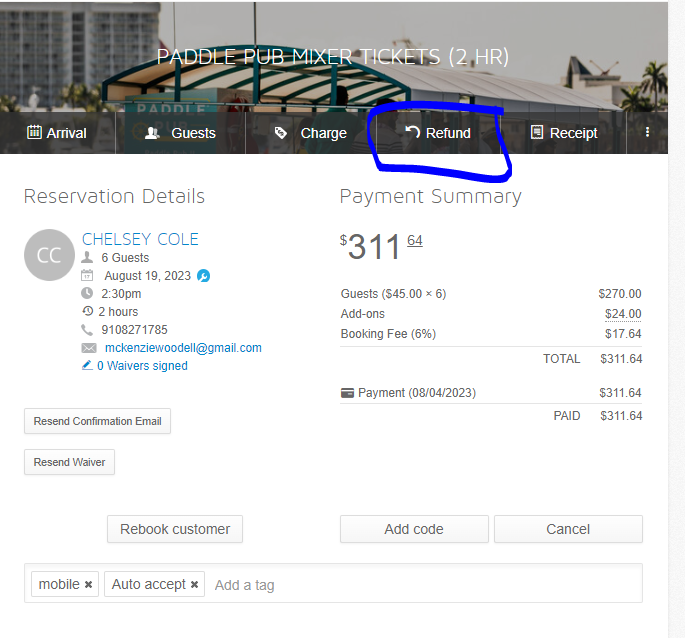
- Issue the Refund in Xola:
- When prompted by Xola on whether to issue a credit, do nothing, or give a refund, select "give a refund."
- You will then be required to manually input the refund amount (the amount after subtracting the trip insurance cost).
- Confirm and process the refund.
Notes:
- It's crucial to be clear with customers from the beginning that the cost of trip insurance is non-refundable. This avoids any misunderstandings during the refund process.
- Always ensure that the refund amount is accurate and corresponds to the policy's guidelines.
- Regularly review competitor practices to remain aligned with industry standards.
Related Articles
Recommended Nationwide Refund & Trip Assurance Policy – TourScale Brands
Applies to: Corporate-Owned Locations (Mandatory) Franchise Locations (Recommended Best Practice) Brands Covered: Trolley Pub • Paddle Pub • Tiki Pub • Cruisin’ Tikis Why We Recommend This Change After reviewing two years of refund and insurance ...Managing and Optimizing Specialty Tours on Xola
Introduction: Creating specialty tour listings on Xola can be a key differentiator for operators. It not only allows a unique experience for customers but can also lead to higher sales. Examples include morning mimosas, sunset tours, or even ...Managing and Optimizing Specialty Tours on Xola
Introduction: Creating specialty tour listings on Xola can be a key differentiator for operators. It not only allows a unique experience for customers but can also lead to higher sales. Examples include morning mimosas, sunset tours, or even ...Royalty Fee Calculation & Collection
Description: Royalty fees represent the payment that franchisees owe to the franchisor based on their sales. This article will explain how these fees are calculated and collected, ensuring transparent communication and a smooth flow of operations ...Setup Facebook Pixel & Conversion Tracking
Setup Facebook Pixel & Conversion Tracking BR Brett Ridenour Last Updated:8/24/23 at 9:47 pm Description: A Facebook Pixel is an invaluable tool for tracking user interactions on your website that are a result of your Facebook ads. By integrating ...